
Candidate Screening Software for Restaurants
By Billy Giordano, Co-Founder, StaffedUp
Former restaurant operator. Built StaffedUp after a “URGENTLY HIRING” Facebook post got zero replies and $400/month on Indeed for three months produced nothing — not one hire.
Last updated: August 2026
Candidate screening software filters a high-volume applicant pool before a manager spends any time on it. It uses knockout questions, availability matching, and scoring to surface only candidates who meet criteria the operator sets — not a generic algorithm’s idea of “qualified.” For a restaurant GM with 80 applications and 20 minutes between services, it’s the difference between reviewing everyone manually and reviewing the five who are actually available Saturday nights, have their food handler card, and can start this week.
What Candidate Screening Software Actually Does (And What It Doesn’t)
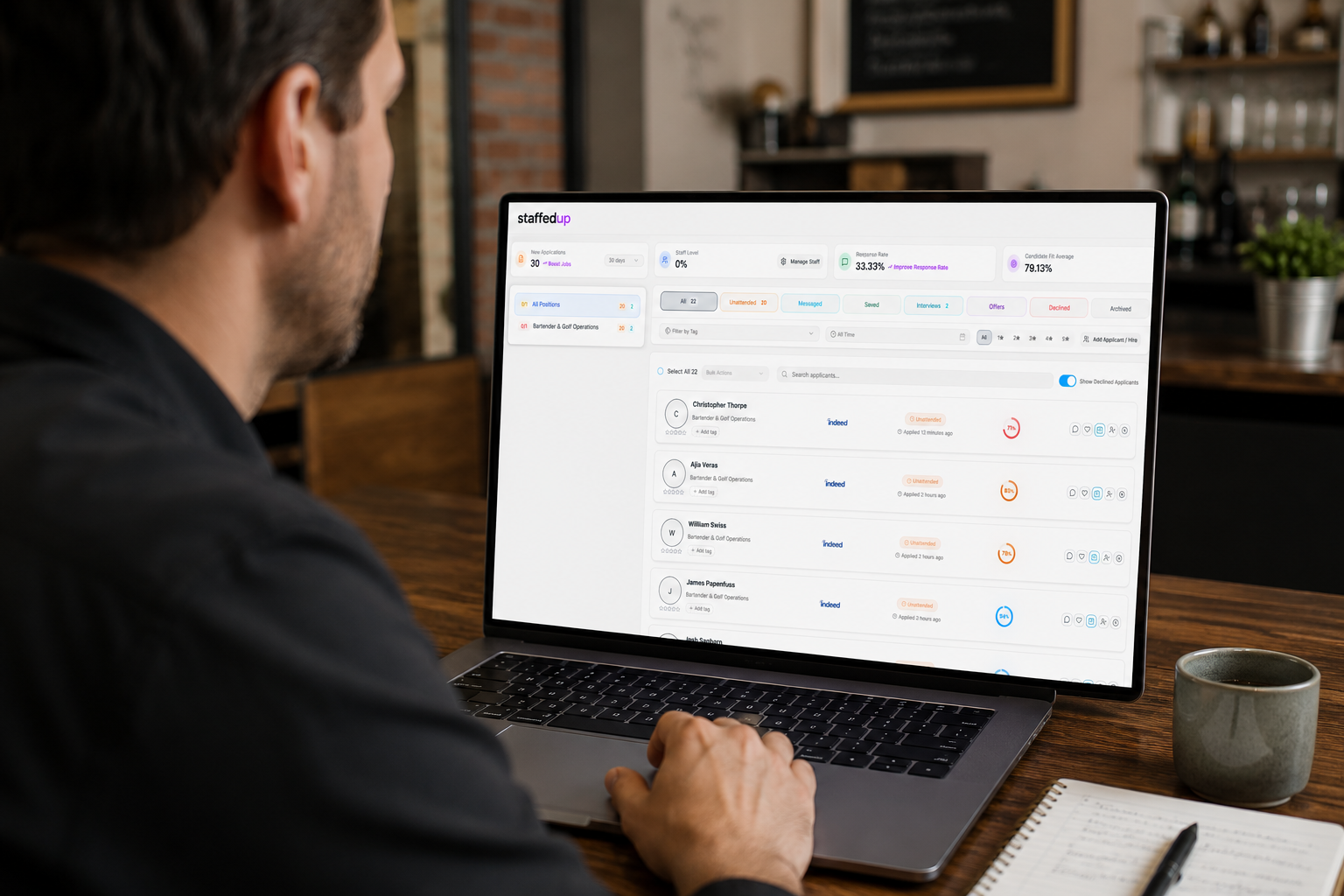
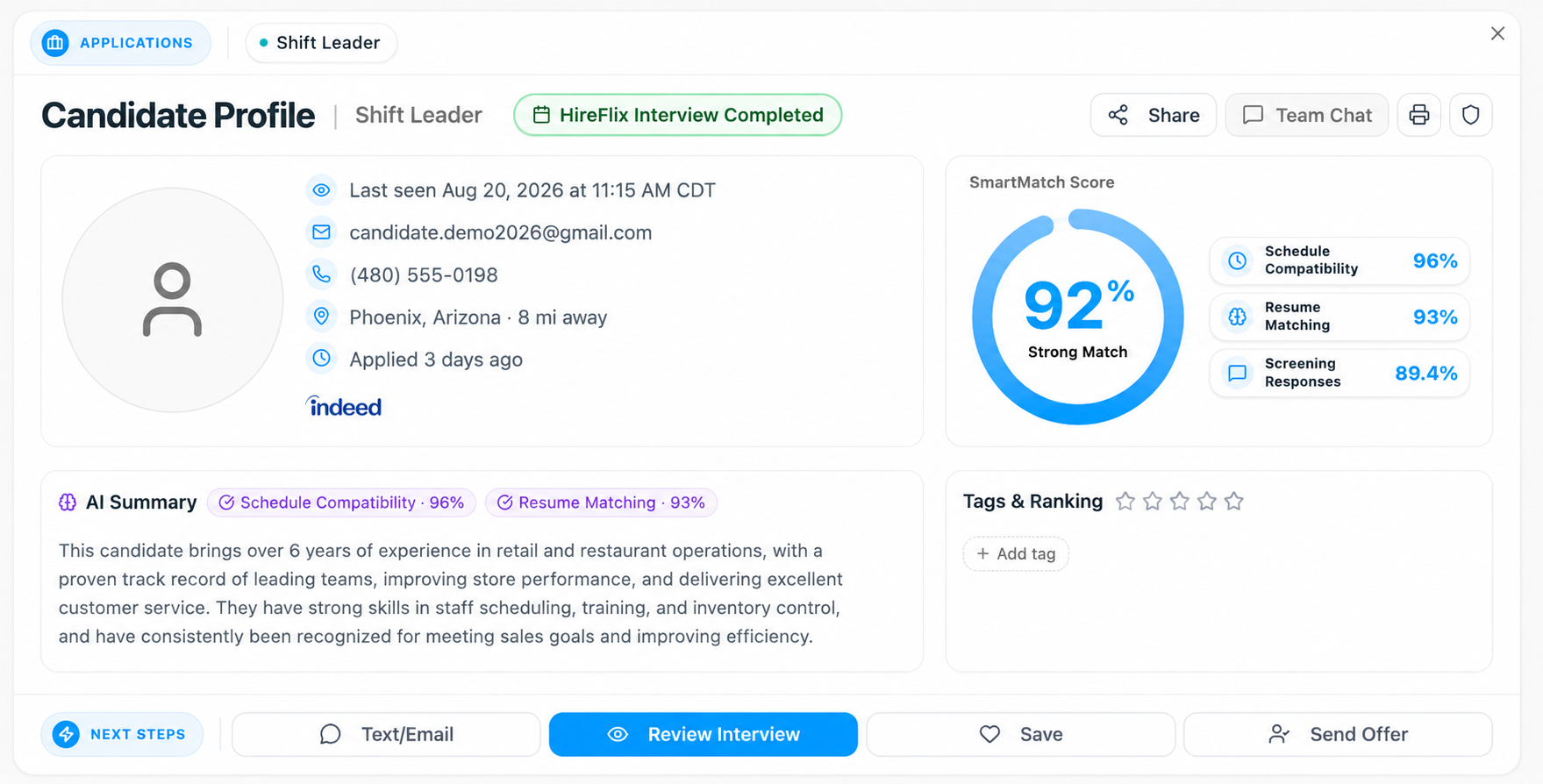
Screening software sits between your job posting and your inbox. Applicants come in, hit your criteria, and only the ones who pass all of them reach you. Four things it does: knockout questions (pass/fail logic that auto-disqualifies applicants who miss a non-negotiable requirement); qualification filtering (matching against availability windows, geographic radius, minimum hours, and required certifications); scoring and ranking (responses scored against your criteria, strongest matches surfaced first); and application consolidation (pulling applications from Indeed, Google Jobs, Monster, and other boards into one pre-screened view).
What it does not do: it doesn’t replace your judgment in an interview, it doesn’t guarantee a good hire, and it doesn’t define “qualified” on its own. The criteria you set determine who gets screened out, which means that decision stays with you — screening is consistent enforcement of your logic, with human oversight at the criteria-setting stage. Some states and cities have rules on how automated screening tools can be used in hiring; laws vary by jurisdiction, so check yours. And one purchasing distinction: some screening tools are standalone, requiring a manual handoff from wherever applications land; others are embedded in an ATS, where that handoff disappears. For the full tracking layer, see how applicant tracking systems work for hourly hiring.
Why Hospitality Hiring Volume Is a Different Problem
Post a server job on a generalist board and, within 72 hours, StaffedUp platform data shows metro-area locations hitting 150–300 applications. A GM running lunch and dinner doesn’t have three hours to sort that. Applications go stale, good candidates accept other offers, and the only people left are the ones waiting on any callback. Annual turnover in the sector ran roughly 65% in 2025 — you’re hiring for the same seat repeatedly, and every hire that doesn’t stick carries a replacement cost in the hundreds to low thousands of dollars, before the manager hours spent on interviews that don’t convert. The National Restaurant Association tracks the openings pressure behind it.
Speed compounds it: hourly candidates often accept the first offer they receive, so a GM who calls a pre-screened candidate within hours wins the hire that a GM sorting 80 unfiltered applications three days later loses. And the mass-apply button makes volume meaningless — easy-apply features mean an application costs a candidate almost nothing, so volume doesn’t signal intent. That’s what screening is for. To address the root cause, see how to reduce restaurant employee turnover; if no-shows are already burning manager time, why hospitality candidates ghost breaks down what structurally prevents it.
What “Qualified” Means in a Restaurant — and How Screening Enforces It
This is the concept missing from most pages on this topic. In office recruiting, “qualified” means a degree, a certification, or years of experience. In restaurant hiring it’s almost entirely logistical: Can you work Friday and Saturday nights? Do you have your food handler card? Can you reliably get here? Will you work at least 25 hours a week? Can you start this week? None of that lives on a resume — a dishwasher doesn’t have one, and a server shouldn’t be disqualified for lacking a LinkedIn profile. Generic corporate ATS screening was built to parse resumes and keyword-match credentials; it doesn’t translate to hourly hiring.
Here’s how enforcement works: before the job goes live, you set the knockout criteria. Every applicant answers your questions, pass/fail logic runs automatically, and only applicants who clear every criterion reach you. You never see a candidate who can’t work your Saturday dinner shift. That’s not AI doing the hiring — it’s your logic, consistently applied at scale, with the hiring decision still yours. One compliance note: the criteria you set is the decision that stays with you, and some states and cities restrict how automated tools can be used in hiring — New York City’s Local Law 144, for example, governs automated employment decision tools. Laws vary by state and city; consult your jurisdiction’s guidance and whoever handles your HR and legal compliance before configuring criteria. How StaffedUp’s Smart Candidate Screening works covers configuring that logic for your posting.
Knockout Questions for Common Hourly Roles: What to Ask
Knockout questions are pass/fail — an applicant answers “no” to a dealbreaker and they’re out, before any human review. Before you build your list: employment law varies by state and city. Ban the Box laws in many jurisdictions restrict questions about prior convictions during the application stage, and questions about protected characteristics — race, age, national origin, disability status, and others — are off-limits regardless of jurisdiction. This is a practical starting framework, not legal advice; validate your specific questions with whoever handles your HR and legal compliance.
| Role | Must-Ask Knockout Questions |
|---|---|
| Server / Bartender | Available Friday and Saturday nights? / Weekend doubles? / Food handler card current (if required)? / Willing to work minimum [X] hours/week? / Over 21 for alcohol service (where applicable)? |
| Line Cook | Available for early AM or late PM shifts? / Experience with [cuisine or equipment]? / Start within 2 weeks? / Able to stand 8+ hours per shift? |
| Host / Cashier | Available weekend lunch and dinner? / Customer-facing experience? / Reliable transportation to this location? / Available for peak holiday periods? |
| Dishwasher / Prep | Available for opening or closing shifts? / Able to lift [X lbs]? / Start this week? |
| All Roles | Legally authorized to work in the U.S.? / Live within [X miles] of the restaurant? |
The right knockout questions match your specific shift structure and actual non-negotiables — a coastal brunch spot differs from a late-night bar. Fill in the bracketed fields for your operation, and connect the logic to the posting itself with a job description that pre-qualifies candidates.
Candidate Screening Software vs. ATS vs. Job Board: What’s the Difference?
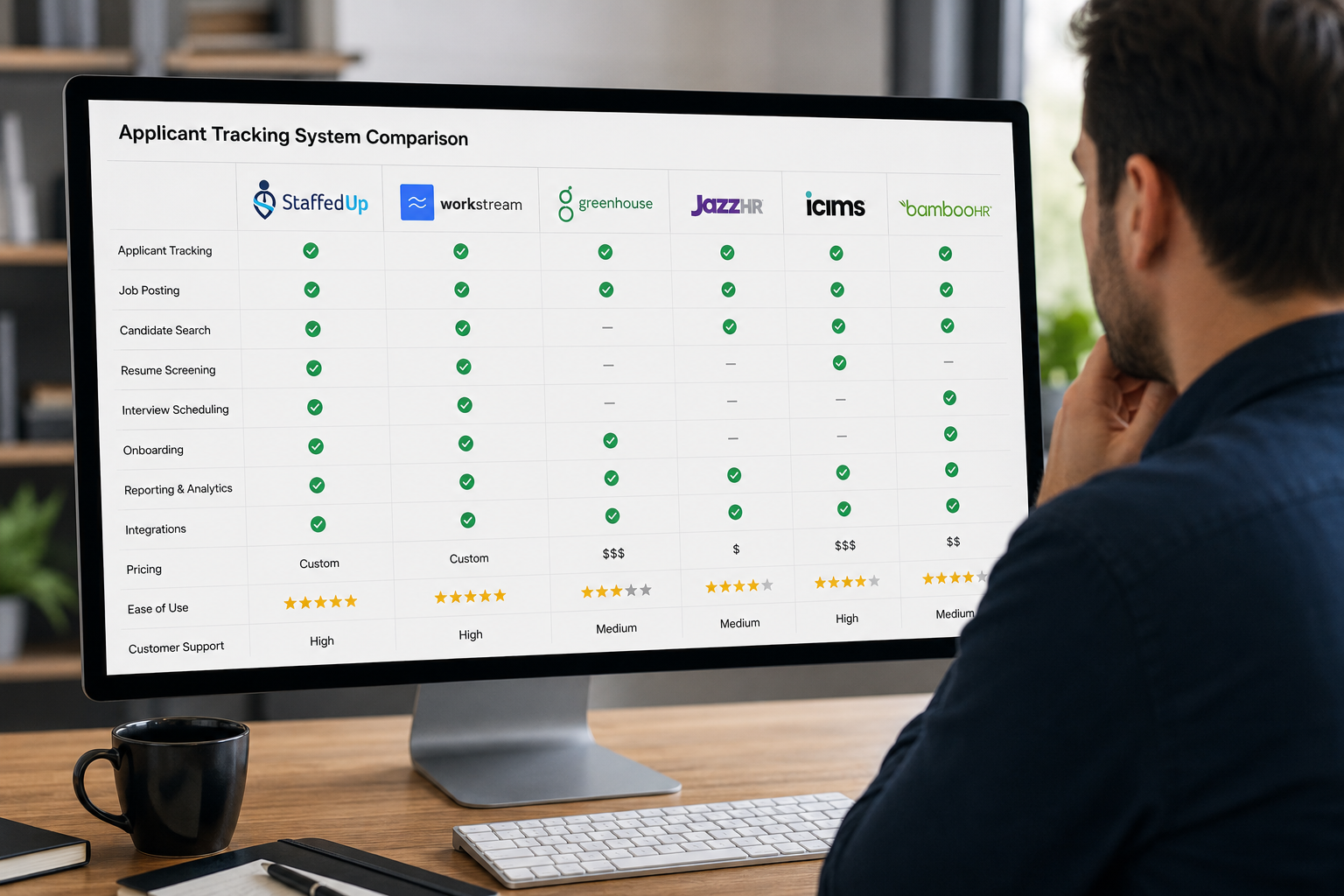
These three get used interchangeably in product marketing. They’re not the same, and confusing them leads operators to buy tools that don’t solve their actual problem. A job board is a sourcing channel — it gets your posting in front of candidates, but getting applicants isn’t the same as getting qualified ones. An ATS tracks candidates through hiring stages after they apply; without a screening layer, it’s tracking everyone, including people who can’t work your shifts. Candidate screening software filters who enters the pipeline before the ATS sees them. When the two are separate, there’s a manual handoff where candidates fall through; when they’re combined, you post once, screening runs automatically, and qualified candidates appear in the same interface where they’re tracked to hire.
| Tool | Primary Function | Who Needs It |
|---|---|---|
| Job Board | Sources applicants — makes your posting visible | Every operator (Indeed, Google Jobs, Monster) |
| Screening Software | Filters the pool before manager review via knockout questions and scoring | Operators with more applications than they can review manually |
| ATS | Tracks applicants through stages; manages communication, scheduling, onboarding | Any operator who needs more than a spreadsheet |
| Integrated platform | All three: posts, screens, and tracks through offer | Multi-unit or high-volume single locations (StaffedUp) |
What to Look For When Evaluating Restaurant Hiring Software
This is buying criteria, not a ranking — evaluate every platform in this category, including StaffedUp, against these factors. Mobile-first candidate experience: most hourly candidates apply on their phones, so an application that runs long on mobile or demands a formatted resume loses candidates before they finish. Operator-configurable criteria: can you set your own knockout questions, shift requirements, and radius, or does the platform lock you into a generic template? If it decides what “qualified” means, it isn’t serving you. Speed-of-review dashboard: how fast can a manager see the qualified pool on a phone, between services? Integration with posting channels: does it push your posting to the boards where your candidates actually are? Pricing transparency and no-contract terms: for independents and small groups, month-to-month matters — StaffedUp plans start at $29/month with in-app cancellation and no contract. One honest caveat: no screening tool replaces a working interview. The software’s job is to get the right five people in front of you; what happens in that 20-minute conversation is still yours to read.
When Do You Need Candidate Screening Software — and When Don’t You?
Most vendor pages won’t say this, so we will: not every operator needs full candidate screening software. You probably don’t need it if you run a single location, hire one or two people at a time, and can review your total application volume in 30 minutes between services — a few targeted knockout questions in a low-cost posting plus a fast callback get you most of the way there. You probably do need it if you’re regularly getting more applications than you can review before they go cold (around 20+ per posting per week is the threshold), or if you’re running multiple locations, stuck in a constant turnover cycle, dealing with consistent no-shows, or managing a seasonal spike where volume triples in 30 days.
The inflection point is specific: when a server posting pulls 80–150 applications and your GM is sorting through them during a double, screening isn’t overhead — it’s the only way to hire without burning out the manager running the floor. Sean O., who runs an Irish pub and grill, posted on Indeed for three months at $400/month and got zero hires — not a volume problem, a screening and distribution problem. His first $1 StaffedUp post with screening logic produced a qualified applicant in 18 hours.
How StaffedUp’s Candidate Screening Works for Hourly Operators
You post once. StaffedUp distributes to major job boards automatically. Applicants self-qualify through the knockout criteria you set, and only qualified candidates reach your inbox — no mass-apply bots, no people who can’t work your shifts. Operators using StaffedUp see 8x more applicants, 77% shorter time-to-hire, and 45% decreased turnover (StaffedUp platform data). And if you don’t have a qualified applicant within 24 hours of your post going live, you pay nothing — the charge reverses automatically.
From 80 applications to the five worth calling
You posted the job; 80 people applied and half can’t work Saturday nights. Screening is how you get to the five worth calling. Post your first job for $1. Under 3 minutes on your phone, no demo, no contract, cancel in-app. No qualified applicant within 24 hours? You pay nothing — the charge reverses automatically.
Frequently Asked Questions
What does candidate screening software do for restaurants?
It filters a high-volume applicant pool using operator-set criteria — knockout questions, availability requirements, distance radius, and certifications — before a manager reviews anyone manually. Only applicants who meet all criteria surface for human review. The manager sees the shortlist, not the full pile.
What’s the difference between an ATS and candidate screening software?
An ATS tracks applicants through hiring stages — from application to offer — and manages communications, scheduling, and onboarding. Candidate screening software filters who enters that pipeline in the first place. Some platforms, including StaffedUp, combine both in one workflow: post once, screen automatically, track through hire.
What are knockout questions in restaurant hiring?
Knockout questions are pass/fail application questions that automatically remove applicants who don’t meet non-negotiable requirements — for example, “Are you available Friday and Saturday nights?” or “Do you have a current food handler card?” An applicant who answers “no” is removed before manager review. Some states restrict certain question types, so check your local rules before configuring.
How does AI candidate screening work for hourly restaurant jobs?
An applicant submits their application and answers your knockout questions. Scoring analyzes responses against the criteria you set — availability, certifications, distance, minimum hours — and ranks applicants by fit. Your inbox shows only candidates who passed all criteria, ranked strongest first. The hiring decision stays with the operator; the software enforces your logic consistently, it doesn’t make the call.
How do I try StaffedUp’s candidate screening — and what does it cost?
Your first job post is $1. Setup takes under 3 minutes from your phone — no desktop, no demo call, no contract, cancel anytime in-app. Plans start at $29/month and include full screening logic with automatic distribution to major job boards. If you don’t have a qualified applicant in your inbox within 24 hours of your post going live, you pay nothing — the charge reverses automatically. Start at staffedup.com/hire.
Sources
- U.S. Bureau of Labor Statistics — JOLTS, Table 4: quits by industry (4.3% accommodation and food services quit rate, March 2026; 2.2% private-sector average).
- U.S. Bureau of Labor Statistics — JOLTS, annual turnover, accommodation and food services (~65%, 2025).
- National Restaurant Association — Restaurant Economic Indicators, job openings (sector labor-market context).
- New York City — Automated Employment Decision Tools (Local Law 144): jurisdiction-specific example of automated-screening regulation.
- StaffedUp platform data — application volume, 8x more applicants, 77% shorter time-to-hire, 45% decreased turnover (internal aggregate).

Hire Smarter, Faster
StaffedUp simplifies hiring for restaurant & hospitality operators. Post your first job for $1.